Angel & Walt Hosting
  • 0 Shopping Cart
  • Home
  • Store
    • Browse All
    • cPanel Web Hosting Plans
    • cPanel Email Hosting Plans
    • eXtend Web Hosting Plans
    • eXtend Email Hosting Plans
    • SSL Certificates
    • SEO Tools
    • Register a New Domain
    • Transfer Domains to Us
  • Knowledgebase
  • Contact Us
  • Chat Now
  • More
  • Account
    • Login
    • Register
    • Forgot Password?
  1. Portal Home
  2. Knowledgebase
  3. Email
  4. How do I create an email spam filter?

  Categories

Advanced
4
Billing
5
Databases
9
Domains
11
Email
12
FAQ
2
FTP
4
Files
4
Hosting
4
Installation Guides
1
Logs
1
Preferences
4
SEO
3
Security
4
Transfers
3
Troubleshooting
10
cPanel
4

  Categories

  Support

My Support Tickets
Announcements
Knowledgebase
Downloads
Network Status
Open Ticket

How do I create an email spam filter? Print

  • 0

  1. Login to cPanel.
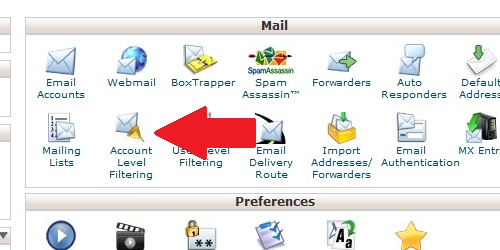
  2. Locate and click on the "Account Level Filtering" icon within the "Mail" category.
Open the Account Level Filtering page within cPanel.
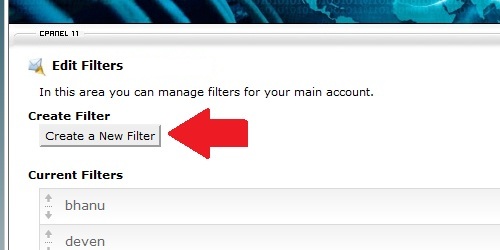
Click on the "Create a new filter" button.
Click on the create a new filter button.
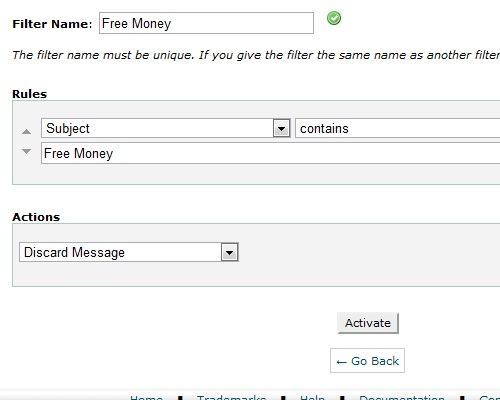
Create the rules for the new spam filter. In the example below, we are blocking all emails with "Free Money" in the subject line:
Create the rules for the spam filter.
Click the "Activate" button to apply the spam filter to all accounts on the domain.

Was this answer helpful?

Related Articles

How do I create an email account in cPanel? Login to cPanel. Locate and click on the "Email Accounts" icon within the "Mail" category.... How do I create an email forwarder? Login to cPanel. Locate and click on the "Forwarders" icon within the "Mail" category.... How do I configure my Default Address? Login to cPanel. Locate and click on the "Default Address" icon within the "Mail" category.... What is a mailing list? A mailing list is a collection of email addresses that can be bound to a single, collective name... How do I create an email filter for a specific user? Login to cPanel. Locate and click on the "User Level Filtering" icon within the "Mail"...
« Back

  Support

My Support Tickets
Announcements
Knowledgebase
Downloads
Network Status
Open Ticket
  • Contact Us
  • Terms of Service

Copyright © 2026 Angel & Walt Hosting. All Rights Reserved.


Loading...
Loading...

Choose Currency

US$ USD
ZWG ZWG

Generate Password

Please enter a number between 8 and 64 for the password length