Angel & Walt Hosting
  • 0 Mein Warenkorb
  • Start
  • Shop
    • Alle anzeigen
    • cPanel Web Hosting Plans
    • cPanel Email Hosting Plans
    • eXtend Web Hosting Plans
    • eXtend Email Hosting Plans
    • SSL-Zertifikate
    • SEO-Tools
    • Domain registrieren
    • Domains zu uns übertragen
  • Wissensdatenbank
  • Kontaktieren Sie uns
  • Jetzt chatten
  • Mehr
  • Konto
    • Anmelden
    • Registrieren
    • Passwort vergessen?
  1. Startseite
  2. Wissensdatenbank
  3. Databases
  4. How do I import a MySQL Database?

  Kategorien

Advanced
4
Billing
5
Databases
9
Domains
11
Email
12
FAQ
2
FTP
4
Files
4
Hosting
4
Installation Guides
1
Logs
1
Preferences
4
SEO
3
Security
4
Transfers
3
Troubleshooting
10
cPanel
4

  Kategorien

  Unterstützung

Supporttickets
Ankündigungen
Wissensdatenbank
herunterladbare
Netzwerkstatus
Ticket öffnen

How do I import a MySQL Database? Drucken

  • 0

  1. Login to cPanel.
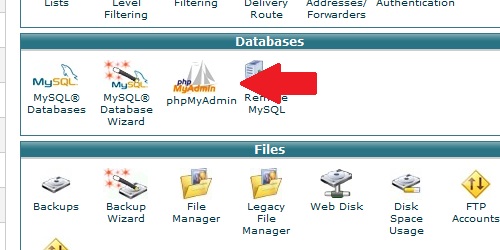
  2. Locate and click on the "phpMyAdmin" icon under the "Databases" category.
Open the phpMyAdmin page from within cPanel.
After phpMyAdmin loads, click on the "Import" tab. Click on the "Choose File" button and select your .SQL file. Click on the "Go" button and your MySQL database will import.

War diese Antwort hilfreich?

Mehr zum Thema

How do I create a MySQL database? Login to cPanel. Locate and click on the "MySQL Databases" icon in the "Databases" category.... How do I delete a MySQL database? Login to cPanel. Locate and click on the "MySQL Databases" icon under the "Databases"... How do I remove a MySQL user from a database? Login to cPanel. Locate and click on the "MySQL Databases" icon within the "Databases"... How do I delete a MySQL user? Login to cPanel. Locate and click on the "MySQL Databases" icon under the "Databases"... How do I add a user to a MySQL database? Login to cPanel. Locate and click on the "MySQL Databases" icon under the "Databases"...
« Zurück

  Unterstützung

Supporttickets
Ankündigungen
Wissensdatenbank
herunterladbare
Netzwerkstatus
Ticket öffnen
  • Kontaktieren Sie uns
  • Nutzungsbedingungen

Urheberrecht: © 2026 Angel & Walt Hosting. Alle Rechte vorbehalten.


Wird geladen...
Wird geladen...

Währung auswählen

US$ USD
ZWG ZWG

Passwort generieren

Bitte geben Sie eine Zahl zwischen 8 und 64 für die Passwortlänge ein