Angel & Walt Hosting
  • 0 Shopping Cart
  • Home
  • Store
    • Browse All
    • cPanel Web Hosting Plans
    • cPanel Email Hosting Plans
    • eXtend Web Hosting Plans
    • eXtend Email Hosting Plans
    • SSL Certificates
    • SEO Tools
    • Register a New Domain
    • Transfer Domains to Us
  • Knowledgebase
  • Contact Us
  • Chat Now
  • More
  • Account
    • Login
    • Register
    • Forgot Password?
  1. Portal Home
  2. Knowledgebase
  3. Databases
  4. How do I delete a MySQL database?

  Categories

Advanced
4
Billing
5
Databases
9
Domains
11
Email
12
FAQ
2
FTP
4
Files
4
Hosting
4
Installation Guides
1
Logs
1
Preferences
4
SEO
3
Security
4
Transfers
3
Troubleshooting
10
cPanel
4

  Categories

  Support

My Support Tickets
Announcements
Knowledgebase
Downloads
Network Status
Open Ticket

How do I delete a MySQL database? Print

  • 0

  1. Login to cPanel.
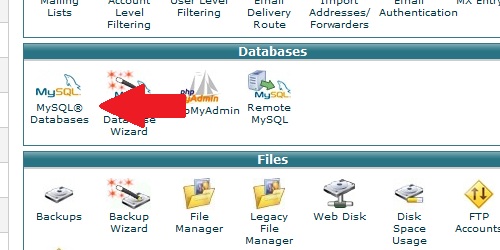
  2. Locate and click on the "MySQL Databases" icon under the "Databases" category.
Locate the mysql databases icon
Under the "Current Databases" heading, select the database you want to delete and click on the "Delete Database"  link. On the next screen, click the "Delete Database" to confirm that you wish to delete the database.

Was this answer helpful?

Related Articles

How do I create a MySQL database? Login to cPanel. Locate and click on the "MySQL Databases" icon in the "Databases" category.... How do I remove a MySQL user from a database? Login to cPanel. Locate and click on the "MySQL Databases" icon within the "Databases"... How do I delete a MySQL user? Login to cPanel. Locate and click on the "MySQL Databases" icon under the "Databases"... How do I add a user to a MySQL database? Login to cPanel. Locate and click on the "MySQL Databases" icon under the "Databases"... My application is asking for database information - where do I get it? Nearly all web applications have a database back-end that require a MySQL database. During the...
« Back

  Support

My Support Tickets
Announcements
Knowledgebase
Downloads
Network Status
Open Ticket
  • Contact Us
  • Terms of Service

Copyright © 2026 Angel & Walt Hosting. All Rights Reserved.


Loading...
Loading...

Choose Currency

US$ USD
ZWG ZWG

Generate Password

Please enter a number between 8 and 64 for the password length