Angel & Walt Hosting
  • 0 Shopping Cart
  • Home
  • Store
    • Browse All
    • cPanel Web Hosting Plans
    • cPanel Email Hosting Plans
    • eXtend Web Hosting Plans
    • eXtend Email Hosting Plans
    • SSL Certificates
    • SEO Tools
    • Register a New Domain
    • Transfer Domains to Us
  • Knowledgebase
  • Contact Us
  • Chat Now
  • More
  • Account
    • Login
    • Register
    • Forgot Password?
  1. Portal Home
  2. Knowledgebase
  3. Domains
  4. How do I create a parked domain?

  Categories

Advanced
4
Billing
5
Databases
9
Domains
11
Email
12
FAQ
2
FTP
4
Files
4
Hosting
4
Installation Guides
1
Logs
1
Preferences
4
SEO
3
Security
4
Transfers
3
Troubleshooting
10
cPanel
4

  Categories

  Support

My Support Tickets
Announcements
Knowledgebase
Downloads
Network Status
Open Ticket

How do I create a parked domain? Print

  • 0

  1. Login to cPanel.
  2. Locate and click on the "Parked Domains" icon in the "Domains" category.
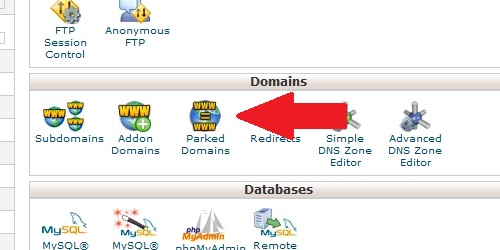
Open the Parked Domains page from within cPanel
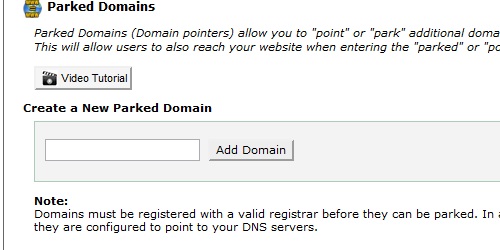
Enter the domain name you wish to park.
Enter the name of the domain you wish to park.
Click on the "Add Domain" button.

Note: This will only work if the parked domain's DNS servers are set to the same as the master domain's.


Was this answer helpful?

Related Articles

What is a domain? A domain is a human-readable name assigned to an IP address to make accessing websites much... What is a subdomain? A subdomain is a subsection of a main domain, in this format: subdomain.maindomain.com... How do I create a subdomain? Login to cPanel. Locate and click on the "Subdomains" icon under the "Domains" category.... How do I create a redirect? Login to cPanel. Locate and click on the "Redirects" icon under the "Domains" category.... What is a redirect? A domain redirect is an instance where a visitor is redirected to a different page when they try...
« Back

  Support

My Support Tickets
Announcements
Knowledgebase
Downloads
Network Status
Open Ticket
  • Contact Us
  • Terms of Service

Copyright © 2026 Angel & Walt Hosting. All Rights Reserved.


Loading...
Loading...

Choose Currency

US$ USD
ZWG ZWG

Generate Password

Please enter a number between 8 and 64 for the password length