Angel & Walt Hosting
  • 0 Shopping Cart
  • Home
  • Store
    • Browse All
    • cPanel Web Hosting Plans
    • cPanel Email Hosting Plans
    • eXtend Web Hosting Plans
    • eXtend Email Hosting Plans
    • SSL Certificates
    • SEO Tools
    • Register a New Domain
    • Transfer Domains to Us
  • Knowledgebase
  • Contact Us
  • Chat Now
  • More
  • Account
    • Login
    • Register
    • Forgot Password?
  1. Portal Home
  2. Knowledgebase
  3. cPanel
  4. How do I find my PHP version?

  Categories

Advanced
4
Billing
5
Databases
9
Domains
11
Email
12
FAQ
2
FTP
4
Files
4
Hosting
4
Installation Guides
1
Logs
1
Preferences
4
SEO
3
Security
4
Transfers
3
Troubleshooting
10
cPanel
4

  Categories

  Support

My Support Tickets
Announcements
Knowledgebase
Downloads
Network Status
Open Ticket

How do I find my PHP version? Print

  • 0

  1. Login to cPanel.
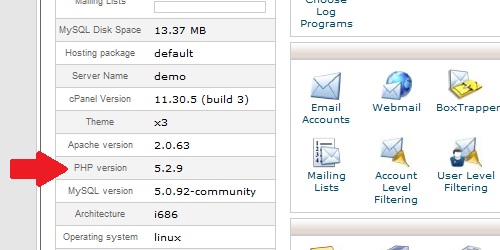
  2. In the "Stats" section on the right, located the row labeled "PHP version". This is your PHP version.

PHP version within cpanel.

Was this answer helpful?

Related Articles

How do I access cPanel? cPanel can be accessed by using either of the URLs below:   www.yourdomain.com/cpanel... How do I find my MySQL version? Login to cPanel In the "Stats" section on the left, locate the row labeled "MySQL Version".... What do my cPanel stats mean? Within cPanel, there are numerous statistics listed on the left of the screen.   Main Domain...
« Back

  Support

My Support Tickets
Announcements
Knowledgebase
Downloads
Network Status
Open Ticket
  • Contact Us
  • Terms of Service

Copyright © 2026 Angel & Walt Hosting. All Rights Reserved.


Loading...
Loading...

Choose Currency

US$ USD
ZWG ZWG

Generate Password

Please enter a number between 8 and 64 for the password length